
Get your TABS Number for Permit today!

Call
972-429-9096
Downloading the AB005 form (also referred to as the TDLR Online Registration Form) is a highly recommended “best practice” for gathering your information.
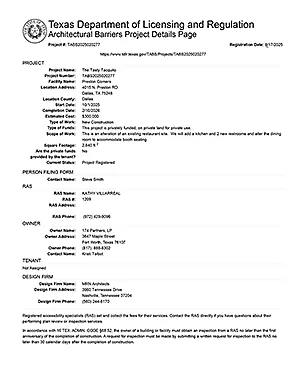
DOWNLOAD
ACCESSplanreview
John A. Villarreal (RAS #408) and Kathy Villarreal (RAS #1209) offer experience in TAS Plan Review and TAS Inspection Services. With offices in DFW and the Rio Grande Valley, we cover Texas from top to bottom. Contact Link
Se Habla Espanol – número tdlr – número TABs
TABS Numbers required at Permitting!
Building Permit Applications in Texas require a TABS Number from TDLR
When you register your construction project with the Texas Department of Licensing and Regulation (TDLR), a TABs number is assigned to your project to help the state monitor and enforce compliance with the Texas Accessibility Standards (TAS). The TABs number will be required on your permit application for building permit.
A TDLR Number, TAS Number, or TABS Number all represent the TDLR Project Registration Number.
ACCESSplanreview video guides you through the TDLR Online Registration changes made in September 2025.
Don't delay your permit - Have these documents ready!
TAS Plan Review and Inspection Fees

TDLR Requirement #1
You will need to have the County Appraisal Number in PDF format to register a project
TDLR Requirement # 2
When the Property Owner is an LLC, LLP or LP
A copy of the Articles of Formation (AOF) or copy of the Texas Secretary of State (SOS) certificate must be uploaded before you get a TDLR number.


SAVE THIS PDF GUIDE FOR YOUR PROJECT!
CLICK the PDF icon to download the file – TDLR Online Registration AB005.
When asked to select a Registered Accessibility Specialist (RAS), choose RAS #1209 Kathy Villarreal.
TDLR Link for project registration - RED BUTTON
Click the RED button to access the TDLR Texas Architectural Barriers System (TABS). After registration, you’ll receive a TDLR TABS Project Number—required for your City Permit.
The link will open in a new window. Keep our website open so you can follow our step-by-step guidance as you complete the process.
Have your credit card ready. The registration fee is $175 by credit card.
SEPT 2025 – TDLR changed the online registration process to include the County Appraisal District number and a form to be signed by any ownership with an LLC. There is more specific information on this website.

Kathy Villarreal RAS #1209
Call me for assistance at 972-429-9096
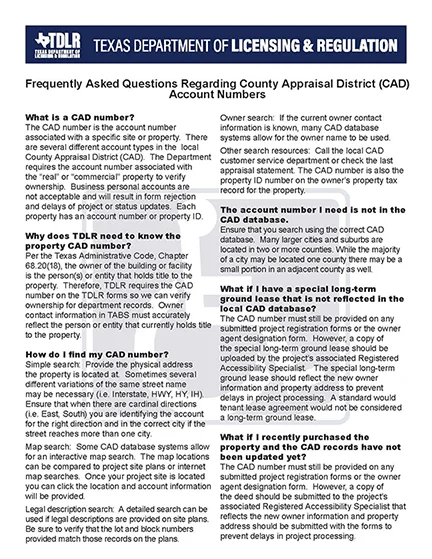
Click on TDLR page for the PDF file link for TDLR instructions.
first WEB SEARCH is REQUIRED
Save document to PDF for uploading.
Each of the 254 counties in Texas has an appraisal district that keeps ownership records for taxpayers.
The CAD number is the account number associated with a specific site or property. There are several different account types in the local County Appraisal District (CAD). The Department requires the account number associated with the “real” or “commercial” property number to verify ownership. Business personal accounts are not acceptable and will result in form rejection and delays of project or status updates. Each property has an account number or property ID – this is the number you will enter in TDLR project registration.
> TDLR Video Link – go to 1:24
Save your CAD record to a PDF file for registration!
second
Documents from the Property Owner are required!
Obtain PDF document for uploading directly from the property owner.
Articles of Formation (AOF) OR copy of the Texas Secretary of State (SOS) document must be uploaded
A FORM after registration is REQUIRED

Save PDF form after registration!
EAB247N
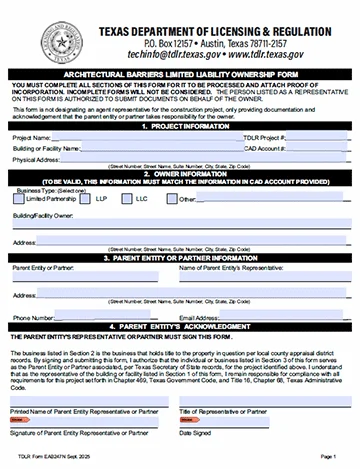
AFTER you get your TABS Number Email forms and a set of Plans to RAS 1209 at ACCESSplanreview@aol.com
accessplanreview@aol.com
SAVE THIS PDF GUIDE FOR YOUR PROJECT!
CLICK the PDF icon to download the file – TDLR Online Registration AB005.
When asked to select a Registered Accessibility Specialist (RAS), choose RAS #1209 Kathy Villarreal.
How do I get a TDLR TABS Number today?
Frequently Asked Questions
At ACCESSplanreview, we know that registering a project with TDLR can feel confusing. That’s why we’ve put together this Q&A section—to answer the most common questions about TDLR project registration.
Beyond quick answers, we also provide step-by-step guidance in the section that follows, so you can get your project number today!
What web page is the link for registration?
Click the RED button to access the TDLR Texas Architectural Barriers System (TABS). After registration, you’ll receive a TDLR TABS Project Number—required for your City Permit.
The link will open in a new window. Keep our website open so you can follow our step-by-step guidance as you complete the process.
Have your credit card ready. The registration fee is $175 by credit card.
SEPT 2025 – TDLR changed the online registration process to include the County Appraisal District number and a form to be signed by any ownership with an LLC. There is more specific information on this website.
What information do I need to complete registration?
Be prepared with:
-
Project name and address
-
Estimated construction cost
-
Owner’s contact information – the CAD Number and Property Owner LLC documentation
-
Type of facility or occupancy
-
Architect, engineer, or contractor details (if applicable)
This PDF form helps you gather the information needed for online registration. Many share it with the landlord, tenant, and designer before completing it. Once filled out, you’ll be ready to register your project online.
CLICK the PDF icon to download the file – TDLR Online Registration AB005.
When asked to select a Registered Accessibility Specialist (RAS), choose RAS #1209 Kathy Villarreal.
How the AB005 TDLR Form from ACCESSplanreview helps you prepare for registration:
Downloading the AB005 form (also referred to as the EAB205N) from ACCESSplanreview is a highly recommended “best practice” for gathering your information. By downloading the TDLR AB005 form you will have all of your information saved into a physical document. Note: TDLR does not let you start the online TABS registration process and continue the process at a later date.
-
You can save the PDF inside your project folder and use the form by sharing completion tasks with the property owner, designer and tenant.
-
The TDLR AB005 form gathers the following information:
- Property ID (CAD Number): Since September 2025, you must enter the County Appraisal District (CAD) number for all non-roadway projects.
- RAS Designation: You must provide the license number of your Registered Accessibility Specialist. ACCESSplanreview recommends using #1209 (Kathy Villarreal).
- Ownership Details: You need the full legal name and email for the person or entity holding the property title.
- Project Scope: A specific description of construction activities and total square footage.
- Limited Liability Documents: If the owner is an LLC, LLP, or LP, the form reminds you that you’ll need to upload Articles of Formation or Secretary of State (SOS) records at the time of Online Project Registration.
-
A link inside the ACCESSplanreview PDF will also take you directly to the TDLR Online Registration website when you are ready to complete registration.
What is next after I get the TABS Number?
State Law regarding registering your project with TDLR is only the FIRST step.
Once you receive your TDLR Project Number, state law requires that you designate a Registered Accessibility Specialist (RAS). The RAS must:
1) A TAS Plan Review of your construction documents for compliance with the Texas Accessibility Standards (TAS), and
2) Conduct a TAS state inspection of the completed project to verify accessibility compliance.
Both the plan review and inspection are mandatory under Texas law and must be completed before the project can be closed.
Citation: Texas Government Code, Chapter 469 – Elimination of Architectural Barriers.
RAS fees for Plan Review and Inspection services are separate from the registration fee and payable to the ACCESSplanreview directly.
Still need help? Click here to go to the TABS Number step-by-step process in the next section
See the next section for a detailed, step-by-step walkthrough with screenshots and tips. Kathy Villarreal RAS 1209 is also available on the phone to help you at 972-429-9096.
NEXT - Email PDF drawings
We will need the Permit Set of Drawings in PDF
accessplanreview@aol.com
NEXT - TAS Plan Review
The TAS Plan Review is performed right after registration. This is a written state report filed with TDLR for compliance.
NEXT - Pay Fees to ACCESSplanreview
We accept: Check, Zelle, Credit Card or ACH to ACCESSplanreview

John Villarreal
RAS 408 TDLR License
John has a architectural design background. He was recruited into the RAS TDLR program and licensed in 2004.
Kathy Villarreal
RAS 1209 TDLR License
Kathy has a background in Teaching/Training and Graphic Art Design. She has been a licensed TDLR Accessibility Inspector since 2012.
Contact Info
Call
972-429-9096
accessplanreview@aol.com
copy the text: accessplanreview@aol.com
DFW Metroplex Home
Secondary office in McAllen TX